 MCP server
Run your job search from your AI assistant.
Connect Sprout to Claude or ChatGPT. Find jobs, see how each one fits your resume, and let Sprout apply for you, without leaving the chat.
No Sprout account? Sign up
Setup
Connect Sprout to your assistant.
Pick your assistant and follow the steps. It takes about a minute. You sign in with Sprout, so your password is never shared with the assistant.
Works on claude.ai, Claude Desktop, and the Claude mobile apps.
- 1
Add Sprout as a connector
Open Settings → Connectors → Add custom connector. Name it Sprout and paste this URL:
URLhttps://api.usesprout.com/mcp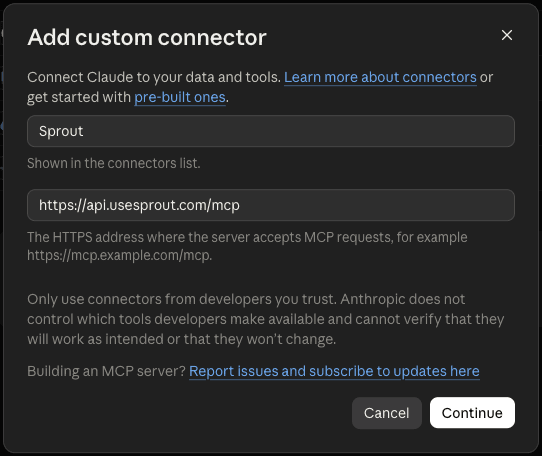
- 2
Sign in and allow access
Select Connect. Sign in to Sprout, then select Allow.
Connect Claude to Sprout
Claude will be able to search jobs for you and see your Sprout profile, resumes, and applications.
AllowCancel - 3
Ask Claude
Start a new chat and try:
PROMPTFind remote backend jobs in Canada and tell me which ones fit my Sprout profile.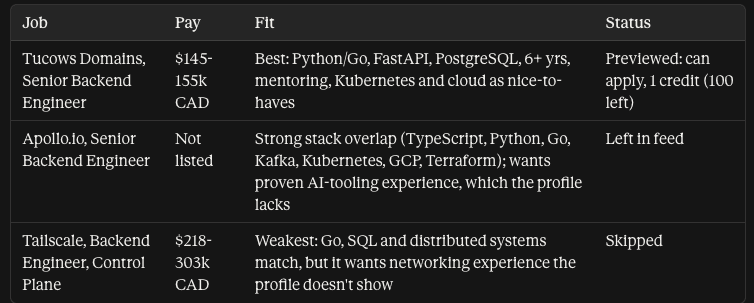
Claude asks before it skips a job or sends an application.
What Sprout can do
Search jobs
Read onlyFilter by title, location, remote or hybrid, job type, seniority, salary, posting date, and company.
Get job details
Read onlyResponsibilities, qualifications, skills, benefits, and pay when listed.
Get my profile
Read onlyYour experience, education, and skills from your active resume. No contact details.
Skip job
Changes your dataHides a job from your searches and your Sprout feed.
Preview job application
Read onlyShows the resume Sprout will use and the credit cost before you apply.
Apply to job
Sends an applicationSprout tailors your application and submits it on the employer's site. Uses 1 credit. Cannot be undone.
Try asking
Good to know
- You approve every application
- Sprout shows a preview first. Your assistant asks before it sends an application, which uses your Sprout plan and credits.
- Disconnect anytime
- Remove Sprout in your assistant's connector or plugin settings. Access stops at once.
- Your data
- Sprout never reads your chat history and never shares your email, phone, or address. See the Privacy Policy.
- Help
- Email support@usesprout.com.